Design Custom Tote Bags in Minutes with Canva Templates
Why Frame Templates Change the Game for Merch Design
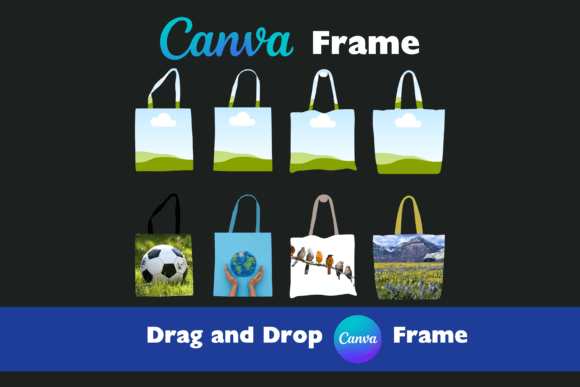
For anyone who has tried to mock up or finalize a design for physical merchandise, specifically tote bags, you know the struggle of visualizing the final product. It is rarely as simple as slapping a logo onto a canvas texture. You have to account for the bag's shape, the stitching, and crucially, the handles. This is where Canva Frame Tote Bag Templates step in to bridge the gap between your digital artwork and a physical product. These aren't just static images; they are functional design assets built directly into the Canva ecosystem. By utilizing Canva’s native "frame" technology, these templates allow you to see exactly how your artwork will interact with the structure of a high-end tote bag in real-time.
The visual appeal of these templates lies in their realism. We aren't talking about flat, cartoonish vectors here. These are high-quality images that mimic the texture and lighting of real fabric. The "personality" of this asset is practical and professional. It serves as a blank slate that adapts to your style, whether you are going for a minimalist brand identity or a loud, artistic statement piece. Because the handles are separate elements, you gain a level of control that is usually reserved for complex packaging design software. You can change the strap color to match your palette without ruining the integrity of the bag's main visual area.
Practical Application: From Brand Identity to Physical Product
As a creative professional, I look for tools that streamline the workflow without sacrificing quality. Canva Frame Tote Bag Templates are incredibly versatile. If you are a small business owner looking to create branded merchandise for an event, these templates are invaluable. You don't need to hire a 3D artist to render a mockup. You simply upload your file, drag your logo or artwork into the frame, and the perspective adjusts automatically. This is a massive win for entrepreneurs and marketers who need quick turnaround times for presentations or social proof.
Content creators and bloggers can use these designs to visualize their latest drop or affiliate products, creating social media graphics that look tangible and desirable. The "drag and drop" functionality means you can iterate rapidly. Want to see how a serif font looks on the bag versus a sans serif font? Or perhaps you want to test a handwritten font for a more artisanal feel? You can swap these elements in seconds. This flexibility is essential for graphic design workflows where client feedback can change direction quickly. It allows you to maintain a professional appearance while remaining agile.
Mastering the Design: Handles, Hierarchy, and Readability
One of the standout features mentioned is the separation of the handles. In packaging design, details matter. A black tote bag with brown leather handles has a completely different vibe than one with white canvas straps. By allowing you to customize these elements independently, the templates help you explore different font pairings and color theories. You can easily test if a bright, pop-culture display font clashes with a neon handle color, or if a subtle modern typography approach works better with neutral tones.
Readability is another critical factor. On a tote bag, you are dealing with a moving, folding surface. What looks good on a flat screen might get lost in the folds of the fabric. Using these templates, you can evaluate the visual hierarchy. Is your main message clear? Is the typeface legible from a distance? Whether you are using a premium font you purchased or a free creative font from Canva's library, the frame allows you to see how ink interacts with the "fabric." This testing phase is crucial for editorial design principles applied to merchandise.
Workflow and Technical Specifications
The technical side is straightforward, which is exactly what busy crafters and hobbyists need. The package includes PDF files and high-quality images without watermarks, ensuring your final output is clean. The process is designed for efficiency:
- Download the file and upload it into Canva.
- Edit the template in Canva by dragging your assets into the frame.
- Download and save the final high-res image to your computer.
This simplicity removes the technical barrier to entry. You don't need to understand clipping masks in Photoshop or complex 3D modeling. However, for the designer who wants to push the boundaries, these templates act as a foundation. You can layer script fonts over the image for a hand-made look or use bold typography for streetwear aesthetics. The key is that the heavy lifting of perspective and realism is already done for you.
Final Thoughts on Creative Flexibility
Ultimately, Canva Frame Tote Bag Templates are about giving you control over your brand identity. In a digital world, physical touchpoints like tote bags create a tangible connection with your audience. By using these templates, you ensure that the transition from screen to fabric is seamless. Whether you are a publisher creating swag for subscribers or a marketer designing a giveaway, the ability to customize every aspect—from the frame to the handle—ensures your design shines. Look around at the collection, find a style that resonates with your project, and start creating. The flexibility to highlight your creativity is right there in the drag-and-drop interface.