Organize Your Life in Greyscale: A Review of Canva Planner Templates
The Power of a Neutral Foundation
In the world of personal productivity and business planning, visual clarity often dictates success. We have all encountered planners that are so busy with decorative elements that the actual content gets lost. The Canva Planner Templates | 10 Pages/GREYS collection takes a different approach. It strips away the noise, offering a sophisticated, monochromatic foundation that serves as a blank canvas for your thoughts, schedules, and strategic goals.
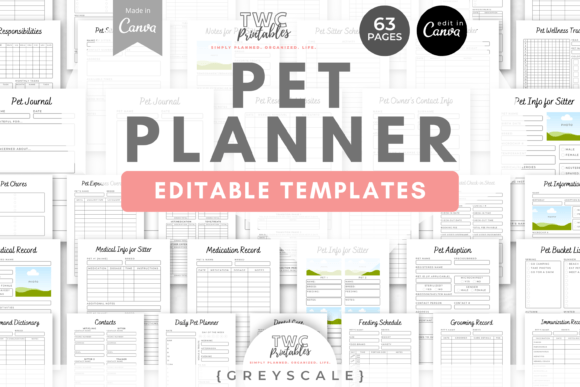
This collection is defined by its "Greyscale" aesthetic. It moves away from the vibrant terracotta and green palettes found in other variations, opting instead for a range of greys, blacks, and whites. This creates a minimalist, modern typography experience that feels professional yet calming. Whether you are a designer managing client projects or a small business owner tracking inventory, the lack of color distraction allows the hierarchy of the content to take center stage. The personality of this template set is one of quiet confidence—it doesn't scream for attention; it simply organizes your life with elegance.
Deconstructing the 10-Page Ecosystem
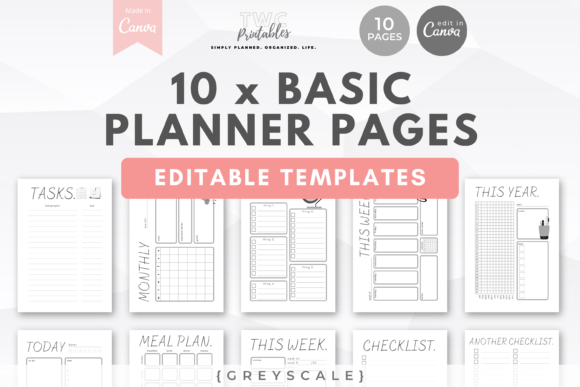
One of the most significant advantages of this digital asset is its versatility. It is not just a single page; it is a cohesive ecosystem of ten distinct templates designed to cover every aspect of your daily and long-term planning. When you download the Canva Planner Templates | 10 Pages/GREYS, you gain access to a structure that supports both micro and macro management.
The collection includes a variety of layouts tailored for different needs. You have the flexibility to print these out for a physical binder or use them as a digital background in a tablet app like GoodNotes. Here is a breakdown of the specific utility provided by the pages:
- Daily and Weekly Planners: These pages are essential for time-blocking and managing immediate tasks. The layout provides ample space for hourly scheduling while maintaining the clean aesthetic.
- Monthly and Yearly Trackers: For long-term goal setting, these templates allow you to visualize the bigger picture. The yearly tracker is particularly useful for habit tracking or monitoring recurring business metrics.
- Functional Inserts: Beyond scheduling, the set includes three distinct checklists, a tasks/projects sheet, and a weekly meal plan. This makes the template pack suitable for holistic life management, combining work and personal wellness.
Because this is built within Canva, the "Greyscale" design is fully editable. While the default palette is neutral, you are not locked into it. The design elements—such as lines, boxes, and typography—can be manipulated. You can adjust the weight of the sans serif font choices or swap them for a serif font to match your specific brand identity.
Strategic Applications for Professionals
For the audience of designers, entrepreneurs, and content creators, a template like this is more than just a calendar; it is a design asset. The Canva Planner Templates | 10 Pages/GREYS can be repurposed in several strategic ways to enhance your workflow and client offerings.
Brand Consistency and Client Presentations
If you run a creative agency or freelance business, presenting a plan to a client requires a professional touch. Using a generic word processor document can feel underwhelming. Instead, you can import your project timelines and deliverables into these templates. The greyscale palette is safe for corporate environments and ensures that your text is the primary focus. By adding your logo to the header in Canva, you transform a simple plan into a branded piece of editorial design that reinforces your professionalism.
Digital Products and Lead Magnets
For marketers and bloggers, the value of a lead magnet cannot be overstated. However, creating design assets from scratch is time-consuming. This collection offers a shortcut. You can customize the Canva Planner Templates | 10 Pages/GREYS to fit a specific niche—perhaps a "Social Media Content Calendar" or a "Project Launch Checklist." Once customized, you can offer these as downloadable PDFs to your email subscribers. The minimalist style appeals to a broad demographic, increasing the likelihood that your audience will actually use the resource.
Print-on-Demand and Packaging
Crafters and hobbyists interested in the print-on-demand market will find the greyscale theme advantageous. Because it does not rely on specific color profiles that might vary between printers, the output is consistent. You could compile these ten pages into a bound booklet or use them as inserts for a traveler's notebook. The neutral aesthetic pairs well with almost any packaging design, allowing you to create a cohesive product line without worrying about color matching issues.
Customization and Typography Hierarchy
While the templates provide a starting point, the real power lies in the customization capabilities within Canva. Understanding how to manipulate visual hierarchy will help you get the most out of the Canva Planner Templates | 10 Pages/GREYS.
The default setup likely uses a clean sans serif font for body text to ensure readability, paired with a bolder weight or a display font for headers. However, you can alter this to fit your taste. Consider these practical adjustments:
- Font Pairing: Try replacing the header font with a modern script font or a handwritten font to add a personal, organic touch to the rigid structure of the planner. This creates a contrast between the functional layout and the artistic header.
- Color Accents: While the "GREYS" theme is the foundation, adding a single accent color—like a deep navy or a burnt orange—to specific checkboxes or headers can help categorize information without cluttering the visual field.
- Element Manipulation: You can remove decorative elements entirely for a hyper-minimalist look or add icons to the checklist sections to aid in quick recognition.
This flexibility ensures that the planner serves the user, rather than the user forcing their life into a rigid template. It is a tool designed for adaptation, making it a valuable addition to any creative's digital toolkit.
Final Thoughts on Utility and Value
The Canva Planner Templates | 10 Pages/GREYS offers a practical, stylish solution for organization. It bridges the gap between a blank notebook and a rigid, non-editable PDF. By leveraging the free Canva platform, users can access a premium-level design experience without the need for advanced software skills like Adobe InDesign or Illustrator.
Whether you are managing a complex marketing campaign, tracking your family's weekly meals, or planning a product launch, the greyscale aesthetic provides a distraction-free environment. It proves that you do not need a rainbow of colors to create an engaging, effective planning system. Sometimes, the most productive choice is the one that clears the visual clutter, allowing you to focus on the work that matters. This collection is a testament to the power of minimalism in modern design and practical daily management.