Streamline Your Digital Product Delivery with Canva Templates
Imagine you’ve just designed a beautiful set of wedding invitations or a comprehensive social media kit for a client. You deliver the final files, only to be met with a flood of emails: “How do I edit this?” “Where are my fonts?” “The colors look different.” This scenario is a common friction point for designers, marketers, and digital product creators. The value of your work gets overshadowed by the support burden. This is precisely the challenge our Canva Editing Instruction Templates are built to solve. They are more than just a PDF; they are a bridge between your expert design and your client’s seamless experience.
More Than Instructions: A Brand Experience
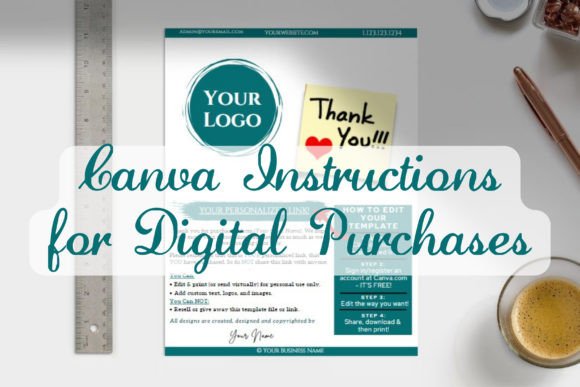
Think of these templates as the first touchpoint of your brand’s post-purchase service. Visually, they are clean, modern, and uncluttered. The design personality is one of clarity and professionalism. It avoids overly playful graphics that might undermine a serious brand, yet it’s not so sterile that it feels cold. The style uses intuitive visual hierarchy, guiding the eye naturally from one step to the next. Icons, clear headings, and ample white space work together to create a document that feels helpful, not overwhelming. This approach respects your client’s time and intelligence, setting a positive tone for their entire interaction with your product.
The true strength lies in its adaptability. Whether your brand identity leans towards a bold, sans serif font with high-contrast colors or a sophisticated, serif font with muted tones, the template’s structure is your canvas. You can easily inject your logo, apply your exact brand color palette, and adjust the typography to match your aesthetic. This ensures the instruction manual feels like a natural extension of the product itself, reinforcing your brand identity at every step. It’s a practical application of brand consistency, transforming a mundane necessity into a professional touchpoint.
Practical Applications Across Your Projects
The utility of these templates extends far beyond a single use case. Consider the diverse needs of your audience. A small business owner selling printable planners needs a foolproof way for customers to access and edit their files. A blogger offering a lead magnet workbook requires instructions that work for a non-designer audience. A graphic designer handing off social media templates to a marketing team needs to ensure the handover is smooth and requires minimal back-and-forth. The Canva Editing Instruction Templates serve all these scenarios by providing a standardized, reliable framework.
They excel in projects where the end-user may not be design-savvy. The clear, step-by-step instructions act as a gentle guide, minimizing confusion and reducing the number of support queries. This is invaluable for scaling a digital product business. For more complex projects, like a full brand kit with multiple file types, the template can be adapted to organize information logically, perhaps using a table of contents or clear section dividers. The goal is information accessibility. All critical details—from the direct Canva link to troubleshooting tips and your support contact—are centralized in one elegant document. This eliminates the frantic search through emails or download folders, creating a truly seamless customer experience.
Integrating for Maximum Efficiency and Satisfaction
Implementing this system is straightforward, but a few thoughtful considerations can elevate the result. First, evaluate the content within the template. Does it cover the specific steps your customers struggle with? You might add a note about which Canva plan is required or include a screenshot showing where to find the “Share” button. The template provides the skeleton; you add the muscle that fits your exact product. This is where your experience as a creator adds immense value.
Next, think about delivery. The PDF should be easy to find. Consider including it in the download ZIP file with a clear name like “START_HERE_Instructions.pdf.” You can also provide a link to a hosted version on your website, which allows for easy updates if Canva’s interface changes. This proactive approach to support is a hallmark of a professional operation. It demonstrates foresight and care, which directly influences brand perception and customer loyalty. A positive, frustration-free experience encourages repeat business and glowing reviews.
Ultimately, the Canva Editing Instruction Templates are about respecting the customer journey. They transform a potential point of confusion into an opportunity for brand reinforcement and exceptional service. By investing a small amount of time customizing this template, you save countless hours of future support and build a reputation for reliability. It’s a strategic design asset that works quietly in the background, ensuring your creative work is received with the ease and satisfaction you intended. For anyone distributing editable digital products, it’s an essential tool for professional delivery and customer peace of mind.