Stylish Personalized Tote Bags: Your Canva Templates Bundle
There is a specific satisfaction in holding a physical object that you designed. A tote bag isn't just a utility; it is a walking billboard, a fashion statement, and a functional piece of art. Yet, the gap between a great idea in your head and a production-ready file is often where projects stall. You might have the perfect boho aesthetic in mind or a sharp logo for a client's trade show, but wrestling with bleed lines, cut marks, and software compatibility can drain the creativity right out of the process.
This is where the Tote Bags Canva Templates Bundle shifts the workflow. It isn't merely a collection of graphics; it is a production bridge designed to move your concepts from the screen to the sewing machine or print shop without friction. By leveraging Canva—a platform most creatives are already comfortable with—this bundle removes the steep learning curve usually associated with vector file creation and product mockups.
Designing Without the Technical Drag
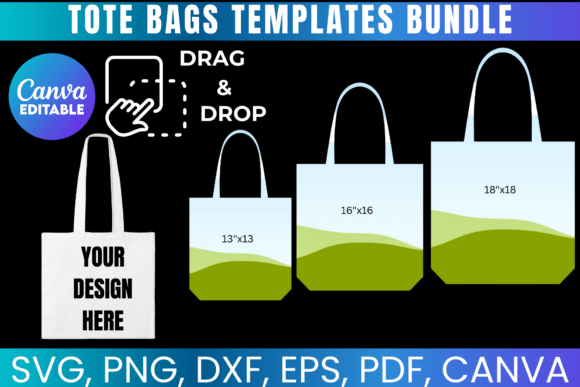
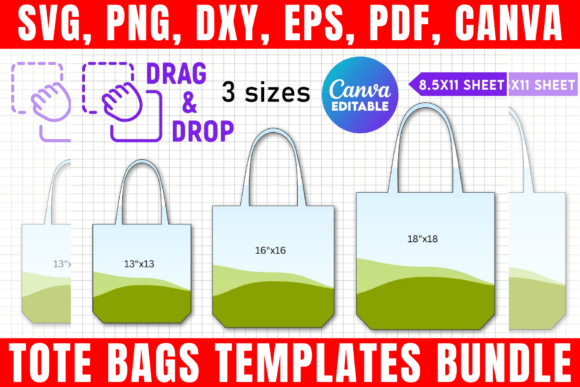
The core appeal of this bundle lies in its versatility and file compatibility. When you download the Tote Bags Templates Bundle, you aren't getting a locked-down file that only works in one expensive software suite. You are getting a multi-format toolkit. The inclusion of SVG, PNG, DXF, and PDF files means you are covered whether you are using a Cricut Maker for heat transfer vinyl, a Silhouette machine for cutting fabric, or Adobe Photoshop for high-end mockups.
For the designer who values modern typography and layout, the Canva integration is a game-changer. We often talk about "premium fonts" and "display fonts" in the context of web design or editorial design, but applying those principles to physical goods requires precision. The Canva frames included in this set act as digital die-cuts. They allow you to clip your artwork—be it intricate handwritten font designs or bold sans serif logos—into the exact shape of the tote bag canvas. This ensures that what you see on the screen is exactly what gets cut, eliminating the guesswork regarding margins and placement.
Consider the "Boho Tote Bag Template" specifically. This style relies heavily on organic flow and aesthetic balance. If you are a small business owner selling handmade goods at a farmer's market, the visual personality of your bag needs to match your product. A script font might work beautifully for a feminine, artisanal vibe, while a strong geometric sans serif might suit a minimalist coffee shop brand. This bundle allows you to test those font pairing strategies instantly. You can drag and drop your brand identity elements onto the template to see how the hierarchy holds up before you ever spend a cent on printing.
From Digital Asset to Physical Product
One of the most overlooked aspects of packaging design is the transition from digital to physical. A design that looks stunning on a 4K monitor might look cluttered on a 15-inch wide tote bag. The visual hierarchy changes when the medium changes. This bundle addresses that by providing realistic Tote Bag Mockups. These aren't just pretty pictures for Instagram; they are strategic tools.
For marketers and content creators, these mockups are essential for social media graphics. You can create a "coming soon" post featuring your design on a shopping tote without needing to manufacture a single unit first. This allows for pre-launch validation. If your audience engages with the mockup, you know you have a winner. If the design feels too busy or the creative font is hard to read at a distance, you can adjust the scale and kerning in Canva immediately.
The bundle also solves a common problem for DIY enthusiasts: the "Gift Bag" dilemma. Creating custom gift bags usually involves awkward paper folding or expensive custom orders. With these templates, you can print high-quality designs on standard 8.5"x11" sheets—perfect for heat pressing onto cotton canvas. The workflow is linear and logical: design in Canva, export as PNG with a transparent background (crucial for layering), and send to your cutter.
Strategic Applications for Business and Creatives
How does this specific asset bundle influence your broader business strategy? It comes down to brand perception and consistency. In a crowded market, a generic tote bag is forgettable. A custom-designed tote bag that utilizes thoughtful typeface choices and cohesive color palettes becomes a keepsake.
Imagine you are a publisher launching a new book. Instead of standard swag, you offer a tote bag featuring a key quote from the book. You can use a serif font for the quote to evoke a literary feel, paired with a clean modern typography style for the author's name. The Tote Bags Canva Templates Bundle allows you to mock this up for your newsletter and social channels to drive pre-orders. It turns a simple accessory into a piece of editorial design.
For the entrepreneur, the value is in the "Shopping Tote" functionality. A sturdy, well-designed shopping bag encourages reuse. Every time your customer carries that bag to the grocery store or the gym, they are providing organic advertising. The SVG files included ensure that your logo remains crisp and scalable, whether it’s a small tag on the side or a massive print across the front. This scalability is vital for logo design integrity.
Practical Workflow and Best Practices
To get the most out of this design asset, approach it with a clear production mindset. Here is how to maximize the bundle:
- Evaluate Your Hierarchy: Before you start customizing, decide on your focal point. Is it a graphic or a slogan? If it's text, choose a bold display font that contrasts with a simpler body font. The Canva frames help you visualize this balance immediately.
- Test for Readability: Tote bags are often viewed from a distance or while in motion. High contrast is your friend. Avoid pairing a light script font with a pastel background unless you are going for a very specific, subtle look. Use the mockups to zoom out and check legibility.
- Utilize the Transparent PNGs: If you are layering your tote design over lifestyle photography for your website, the transparent PNG files are indispensable. They allow for seamless compositing in Photoshop or even Canva, ensuring your social media graphics look professional and integrated.
- Consider the Material: While the template handles the design, remember that ink behaves differently on canvas than on paper. High-detail vector art (provided in the SVG/DXF formats) is safer than complex raster gradients if you are doing vinyl cutting.
This Tote Bags Canva Templates Bundle