Transform Your Cruise Door with Editable Canva Templates
A Designer's Approach to Personalized Stateroom Decor
Walking down a cruise ship corridor can feel like a parade of identical white doors, each one indistinguishable from the next. That blank canvas represents a missed opportunity for personal expression, group identification, and pure vacation fun. Enter the world of cruise door decorations, a surprisingly vibrant niche where design meets travel enthusiasm. Using pre-made, editable templates in Canva offers a practical bridge between custom professional design and DIY crafting, allowing anyone to create standout door markers without needing advanced software skills or a graphic design degree.
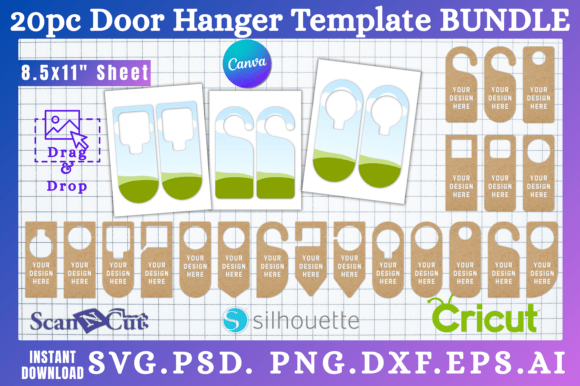
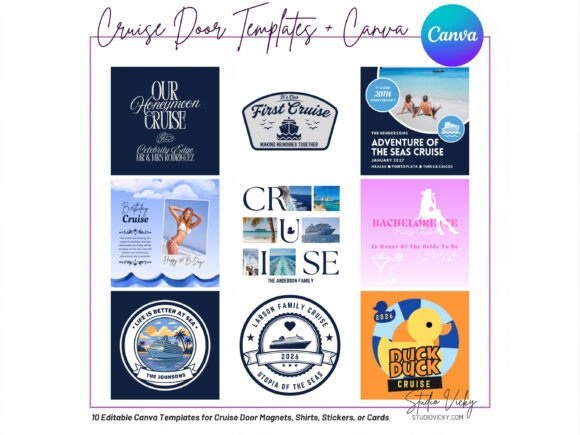
This collection of 10 professionally designed Canva templates provides a structured yet flexible starting point. Think of it less as a rigid product and more as a set of creative building blocks. The core value lies in the balance: each design has a strong, visually appealing foundation—a specific style, color palette, and compositional layout—while remaining fully editable. You're not just getting a static image; you're getting a layered digital file where text, colors, and sometimes even minor graphic elements can be adjusted to fit your exact needs. This approach respects the user's time while encouraging creative ownership.
Deconstructing the Visual Toolkit: Style, Flexibility, and Application
The personality of these templates leans into celebratory, welcoming, and thematic design. You'll find styles that range from clean and modern to playful and ornate, ensuring there's a visual match for various cruise occasions. A honeymoon cruise design might feature elegant script fonts and soft metallic tones, evoking romance and sophistication. In contrast, a family reunion template could use bold, friendly sans-serif typefaces and a vibrant, inclusive color scheme. The visual hierarchy in each template is carefully constructed—the main event title (e.g., "Happy Anniversary") is prominent, with placeholders for names and cabin numbers logically placed below or integrated into the design flow.
Where do these templates truly shine? Their primary application is, of course, as magnetic door decorations or printed signs for your cruise stateroom. This is a classic example of packaging design in a micro-scale—you're "packaging" your family or group identity for easy recognition. But their utility extends further. They function exceptionally well as design assets for creating related social media graphics. Imagine using the same visual language from your door decoration to create a "We're on a cruise!" Instagram post or a Facebook album cover. This creates cohesive brand identity for your vacation, a detail that content creators and bloggers will particularly appreciate.
From a practical design perspective, evaluating the template's fit for your project is straightforward in Canva. Before you commit to editing, consider the following:
- Font Pairing and Readability: The templates use curated font pairings—a display font for headlines paired with a highly legible sans serif font for details. At the small size of a cabin door, clarity is paramount. Test how the text looks when zoomed out. Avoid over-customizing with overly decorative fonts that might sacrifice readability at a distance.
- Color Customization: Canva makes color changes simple. Ensure your chosen colors have enough contrast to be seen clearly. This isn't the place for subtle, low-contrast editorial design choices; it's about immediate visual impact.
- Commercial Use and Licensing: It's critical to understand that these are digital download files for your personal use. The license typically allows you to create physical items for yourself or as gifts. If you're a small business owner considering creating and selling physical door decorations using these templates, you must verify the specific license terms of the seller. Most template licenses restrict resale of the digital files themselves.
From Digital File to Physical Decoration: A Seamless Process
The workflow is designed for efficiency. After your instant digital download, you open the Canva link, duplicate the template, and begin editing. The process is intuitive: click on the text to change it, use Canva's color picker to adjust hues, and upload your own photos if the template allows. This is where the "easy-to-customize" promise holds true. It's a practical application of modern typography principles, democratized through a user-friendly platform.
For printing, you have options. You can print at home on high-quality cardstock and laminate it for durability, or use a professional print service. The included high-resolution files ensure your design looks crisp and professional, whether it becomes a small magnet or a larger door sign. This reliability in output is a key benefit of using a structured template over starting from scratch in a basic program. It provides the professionalism of premium font and design choices without the associated learning curve or cost.
Ultimately, these Cruise Door Decorations Canva Templates serve a specific, joyful purpose. They solve the problem of generic, impersonal cruise doors with a solution that is accessible, customizable, and visually engaging. They empower groups—from bachelorette parties to multi-generational families—to add a layer of personality to their shared experience. For the design-savvy traveler, it's a chance to apply creative skills in a fun, low-stakes context. For everyone else, it's a straightforward path to making your vacation space feel uniquely yours before you even unpack. The real-world value is in the smile it brings when you see your personalized door at the end of a long hallway, a clear signal that you've arrived and are ready to celebrate.