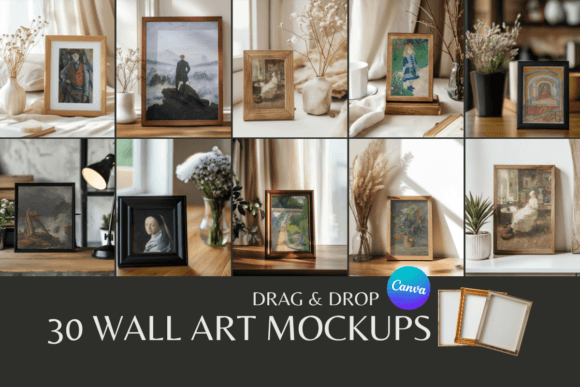
30 Wall Art Mockups: Elevate Your Canva Designs
Transforming Digital Files into Tangible Art
There is a specific hurdle every digital artist and photographer faces when moving from creation to commerce: the gap between a flat image file and a finished product. You can create a stunning illustration or capture a breathtaking landscape, but how do you convince a potential buyer that it will look just as good hanging above their sofa? This is where the psychology of visual hierarchy and realistic presentation comes into play. The collection of 30 Wall Art Mockups - Canva Templates is designed specifically to bridge that gap, offering a curated suite of high-quality scenes that turn abstract ideas into concrete lifestyle imagery. These aren't just placeholders; they are environmental storytelling tools that allow you to place your artwork into realistic, well-lit interior settings.
As a creator, your time is likely split between production and marketing. The friction of traditional mockup software—often requiring expensive subscriptions or complex layer management—can stifle your workflow. By utilizing these Canva templates, you bypass the steep learning curve associated with professional editing software. The appeal lies in the accessibility; you do not need a premium font license or a Pro account to access the core functionality. Instead, you get a streamlined user experience that focuses on the end result: a professional-grade image ready for your Etsy shop or Shopify store. It is a practical solution for the modern small business owner who values efficiency without compromising on the brand identity they are trying to build.
The Role of Context in Brand Perception
When a customer scrolls through a marketplace, they are not just buying a piece of paper or a digital download; they are buying a feeling. They want to know how that art will fit into their life. This is why editorial design principles apply even to e-commerce. A mockup provides context. It shows scale, texture, and lighting. If you are selling a minimalist line drawing, placing it in a mockup featuring a modern, Scandinavian-style living room reinforces the modern typography and aesthetic of the work itself. Conversely, a vintage botanical print needs a setting that suggests warmth and history. The diversity within these 30 templates allows you to match the "personality" of your art to the environment, significantly influencing brand perception and audience engagement.
Consistency is key in graphic design and brand identity. Using a disjointed set of images can make a shop look amateurish. By having access to a library of 30 variations, you can maintain a cohesive look across your entire product catalog while still offering variety. This variety is crucial for social media graphics. On platforms like Instagram or Pinterest, visual repetition can lead to fatigue. However, rotating through different interior scenes keeps your feed dynamic. You might use a bright, airy kitchen scene for a botanical print and a moody, dark office setting for a motivational quote display font piece. This versatility ensures your design assets work hard for you across different channels, from your main website headers to your email marketing campaigns.
Practical Application for Entrepreneurs and Designers
For the entrepreneur or marketer, the utility of the 30 Wall Art Mockups - Canva Templates extends beyond just listing products. Consider the power of packaging design presentations. If you are pitching a wholesale partnership with a boutique, sending a PDF that shows your art hanging in a stylized setting is far more persuasive than a bare digital file. It demonstrates that you understand the retail environment. Furthermore, these templates are invaluable for A/B testing. You can quickly swap out the artwork within the Canva link to see which "frame" or "room" setting generates more clicks on your landing page. This data-driven approach to web design and product presentation is what separates hobbyists from successful businesses.
The technical ease of use cannot be overstated. The workflow is intuitive: you download the ZIP, access the PDF, and click the links to open the templates directly in your browser. From there, the drag-and-drop interface of Canva allows you to insert your image, resize it, and position it within seconds. This is particularly beneficial for content creators and bloggers who need to produce high volumes of content quickly. Imagine you are writing a post about "Home Office Decor Ideas." Instead of searching for stock photos, you can create custom images featuring your own digital art products, seamlessly integrated into a professional creative font and aesthetic environment. It adds a layer of authority and professionalism to your content that generic stock photography simply cannot provide.
Commercial Use and Creative Freedom
One of the most significant aspects of this collection is the licensing model. The allowance for commercial use (provided you add your own graphics) opens up a world of opportunity. You are not restricted to personal projects; you can use these images to drive revenue immediately. Whether you are a crafter selling printable quotes or a photographer selling landscape prints, the mockups serve as the final polish on your product photography. It is important, however, to respect the boundaries of the license. The prohibition on redistributing the unedited mockups ensures that the value of the asset remains intact for all users, maintaining a standard of quality within the community that uses them.
When selecting which of the 30 templates to use for a specific piece, think about readability and focal points. If your artwork is intricate and detailed, choose a mockup with a simple, uncluttered background. If your art is bold and graphic, you might opt for a room with more texture to create an interesting contrast. Think of the mockup as a serif font or sans serif font in a sentence—it should support the main message, not compete with it. The goal is to create a harmonious composition where the room enhances the art, not distracts from it.
Ultimately, these 30 Wall Art Mockups are more than just pretty pictures; they are a strategic asset for anyone looking to professionalize their creative output. They solve the universal problem of context, allowing you to show, rather than just tell, how your art lives in the real world. By leveraging the accessibility of Canva and the professional quality of the scenes, you can streamline your production process, enhance your visual hierarchy, and present a polished, consistent brand identity to the world. It is a practical, efficient, and high-impact tool for the modern creative economy.