Mobile Frame Mockups - Canva Templates: Show Off Your Digital Work
So you’ve designed a sleek new mobile interface, crafted the perfect Instagram bio link, or edited a video you know will stop the scroll. You have the file ready, but presenting it as a static image or a screen recording feels flat. It lacks context and professionalism. That’s where a solid mockup strategy comes in, and honestly, finding a tool that doesn't require a PhD in Photoshop is a lifesaver for busy entrepreneurs and creators. If you are looking to bridge the gap between your raw digital files and a polished portfolio piece, you need to look at Mobile Frame Mockups - Canva Templates.
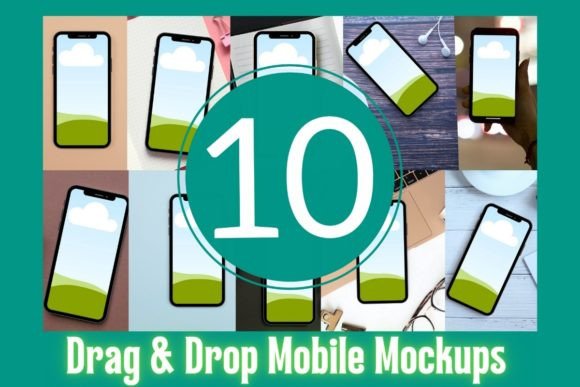
This set isn't just about placing a picture inside a picture; it is about utilizing modern typography and layout principles within Canva to make your content pop. With ten distinct designs, these templates are built for the drag-and-drop generation. You don't need to be a graphic design wizard to make your work look like it belongs in a high-end agency portfolio. The core appeal here is the "personality" of the mockups—they are clean, contemporary, and versatile enough to handle anything from corporate branding to casual lifestyle content.
The Anatomy of a High-Converting Mockup
Let’s talk about the visual characteristics. When we discuss design assets, we usually look for flexibility. These templates come in at a hefty 2700 x 2025 pixels. In the world of digital publishing and print, resolution is king. Whether you are displaying this on a 4K monitor or printing it out for a case study presentation, the clarity remains sharp. The frames themselves are designed to be neutral enough not to distract from your work, yet stylish enough to provide that "device context" which viewers instantly recognize.
Think about how a premium font changes the feel of a document; a mockup does the same for your digital product. It frames your content. It sets the stage. For a brand identity project, seeing a logo or color palette applied to a mobile screen instantly validates the design. It tells the client, "This is how your brand will live in the real world." The style of these specific Canva templates leans towards that clean, minimalist aesthetic that works for almost every industry, from tech startups to lifestyle blogs.
Real-World Applications for Designers and Entrepreneurs
You might be wondering where exactly these fit into your workflow. The answer is: almost everywhere. We aren't just talking about web design portfolios here. If you are a social media manager, these mockups are gold for social media graphics. Instead of just posting a link to a client's new landing page, you can show the actual interface on a phone. It adds a layer of professionalism that standard link previews often lack.
Here is a breakdown of who benefits most and how:
- App Developers & UI/UX Designers: Use these to create editorial design layouts for case studies or Behance presentations. A high-res mockup can highlight the nuance of your button spacing or color choices better than a raw screenshot.
- Content Creators & Influencers: Have a trending video? Don't just repost it. Drop it into a mockup to create a unique visual for your YouTube community tab or Pinterest board. It separates your content from the noise.
- Small Business Owners: Launching a new menu or booking system? Show customers exactly what the experience will look like on their phones. It builds trust and familiarity before they even click.
I remember working on a packaging design project where the client also needed an e-commerce site. We used a mockup just like these to show how the physical packaging texture translated to the mobile shopping cart experience. It connected the dots for the client in a way that flat JPGs never could.
Mastering the Drag-and-Drop Workflow
One of the biggest hurdles in design is the technical barrier. That is why the integration with Canva is such a selling point for Mobile Frame Mockups - Canva Templates. You don't need to mess with clipping masks or smart objects. You simply upload your image or video, drag it onto the template, and Canva handles the framing.
However, just because the tool is easy doesn't mean you shouldn't think like a designer. Here are a few practical tips to get the most out of these assets:
- Check Your Aspect Ratios: While the template is large, your source material matters. If you are mocking up a website, ensure your screenshot is cropped to a standard mobile ratio (like 9:16) before uploading to avoid awkward stretching.
- Consistency is Key: If you are using these for a logo design presentation or a brand deck, try to stick to one or two mockup styles from the set. Jumping between too many different frames can make your presentation feel disjointed.
- Use Video: Don't forget that Canva supports video. Using these templates to display a screen recording of a user flow can be incredibly effective for web design pitches.
Beyond the Screen: Print and Editorial Uses
It is easy to pigeonhole digital mockups as strictly for online use. But remember that 2700px width? That opens the door to print. If you are working on editorial design for a magazine or a lookbook, a high-quality mobile mockup can serve as a visual break in the layout. It contextualizes your digital assets within a physical medium.
Consider a scenario where you are pitching a new commercial font or a creative font library. Instead of just showing the alphabet, show the font in use on a mobile interface. How does that sans serif font look on a button? Is that script font readable in a mobile header? These mockups allow you to test and showcase readability and visual hierarchy in a realistic environment. It is practical proof that your typeface works.
Licensing and Long-Term Value
Finally, a quick note on usage rights. These templates are designed for both personal and commercial use. That means you can use the final images you create in client work, on your website, or in your shop. The restriction is simple: you cannot resell the templates themselves as a digital product. You have to add value to them.
This is standard practice for design assets and protects the creator while empowering you. It allows you to build a library of visual content that elevates your brand without worrying about copyright strikes. Whether you are a hobbyist sharing your latest coding project or a professional agency presenting a mobile app strategy, having a reliable set of mockups in your toolkit is essential. It is the difference between showing someone a blueprint and handing them the keys to the finished house.