Canva KDP Cover Templates + Bonus: Simplify Your Book Design
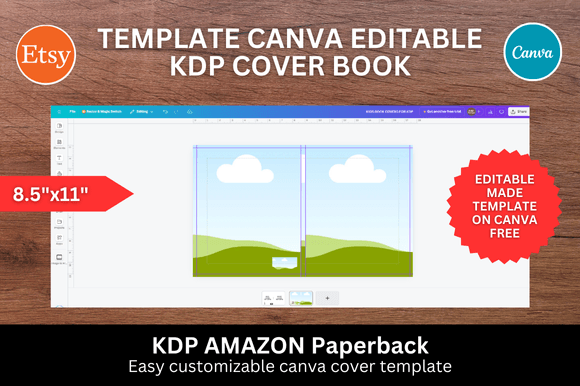
Creating a professional-looking book cover for Amazon KDP can feel like a major hurdle, especially if you're not a trained graphic designer. The good news is that you don't need expensive software or complex skills to produce a cover that stands out. The Canva KDP Cover Templates + Bonus pack is designed specifically to bridge that gap, offering a streamlined path from idea to a finished, upload-ready cover. This resource focuses on the popular 8.5x11 inch dimension, a versatile size ideal for journals, workbooks, activity books, and various low-content publishing niches. Its core appeal lies in its simplicity and the empowerment it offers creators at any skill level.
Designed for Speed and Simplicity
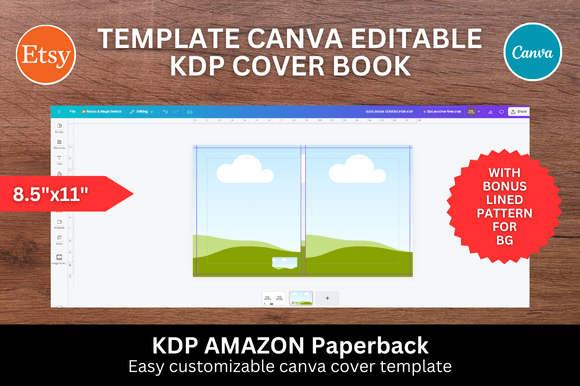
The fundamental strength of these Canva templates is the drag-and-drop workflow. You start with a professionally structured foundation. The template provides the correct bleed, trim, and safe zones for KDP, eliminating the guesswork and technical errors that often cause upload rejections. Your role becomes purely creative. You can instantly upload your own images, patterns, or illustrations and drop them into the pre-defined spaces on the cover. This process transforms what could be hours of layout work into a matter of minutes. For entrepreneurs and content creators publishing multiple books, this efficiency is invaluable. It allows you to maintain a consistent publishing schedule without sacrificing design quality.
Included in the package are five distinct background patterns. These aren't just generic fills; they are curated design assets that add texture, color, and personality. A well-chosen pattern can instantly communicate the book's theme—think playful geometrics for a children's activity book, or elegant florals for a guided journal. This bonus gives you a ready-made starting point for visual storytelling. You can use the patterns as-is, adjust their color within Canva, or even layer them with your own graphics for a truly unique look. The result is a cover that feels cohesive and intentional, key factors in building a recognizable brand identity on the Amazon marketplace.
Where These Templates Shine: Real-World Applications
The 8.5x11 inch book cover template is a workhorse format. It’s perfect for a wide array of low-content and medium-content books. This includes lined journals, dot-grid notebooks for bullet journaling, planners, gratitude journals, sketchbooks, puzzle books, coloring books, and educational workbooks. For publishers and small business owners, creating a series of complementary notebooks with consistent cover design elements—using this template—can strengthen your brand's presence in a specific niche. A set of related covers on an Amazon author page looks professional and encourages multiple purchases.
Beyond direct publishing, the design principles here are useful for digital and print projects alike. A mockup created using this template can serve as a powerful social media graphic to promote your upcoming book launch. The visual consistency between your promotional material and the final product builds trust with your audience. Bloggers and content creators can also use the template to design companion workbooks or printable guides that align with their online content, offering another value-added product to their readers. The flexibility of Canva means your cover design can be adapted for related marketing materials, ensuring a unified look across your entire project.
Making the Design Work for You: Practical Guidance
While the template provides the structure, your design choices bring it to life. Here’s how to maximize this resource. First, consider your audience. The visual style—colors, imagery, and pattern choice—should resonate directly with your target reader. A journal for mindfulness practitioners will have a different aesthetic than a notebook for teenage gamers. Use the drag-and-drop feature to test different images. Sometimes, a simple, bold graphic works better than a complex scene. Pay attention to visual hierarchy; ensure your title is the most prominent text element, followed by your subtitle or author name. The template's layout should guide this naturally.
When it comes to font pairing, even though the templates are image-focused, text is still critical. Canva offers a vast library of free and premium fonts. A good rule of thumb is to pair a clear, easy-to-read sans serif font for your title with a simpler complementary font for subtitles. Avoid using overly decorative script fonts for large blocks of text, as they can harm readability, especially at thumbnail size on Amazon. Always view your design at a small size to ensure the title is legible. This is a crucial step in editorial design that directly impacts customer click-through rates.
Finally, understand the licensing. The templates themselves are provided for you to create end products—like your book cover—for sale. The graphics and patterns included are part of the design asset you are purchasing. Always double-check the specific license terms provided with your download to ensure your intended use, especially for commercial projects, is fully covered. This due diligence is a key part of professional publishing. By leveraging the Canva KDP Cover Templates + Bonus effectively, you equip yourself with a practical tool that saves time, reduces technical friction, and helps you produce polished, market-ready book covers with confidence.