Pricing Catalogue Templates: Your Wholesale Sales Kit
Creating a professional line sheet or wholesale catalog used to be a logistical headache. You had to hire a designer, wait for proofs, and pay for every single revision. If you wanted to change a price or swap a product photo, you were back to square one. The modern entrepreneur needs agility. You need a system that allows you to present your products to dream retailers without the overhead of a design agency. This is where the value of a high-quality Pricing Catalogue Templates bundle comes into play. It is not just about having a pretty PDF; it is about having a functional, editable business tool that communicates professionalism and clarity to potential buyers.
Visual Style and Functional Design
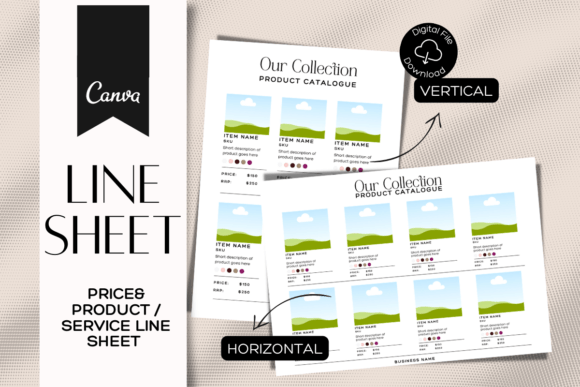
When you open a well-constructed pricing catalogue, the first thing you should notice is the balance between whitespace and content. These templates are designed with a specific visual personality: clean, organized, and direct. Unlike a chaotic mood board, a catalogue template relies on a strong grid system. This structure ensures that your products remain the hero of the page. The visual appeal lies in the simplicity of the layout. It uses modern typography principles to guide the buyer’s eye from the product image to the description, and finally to the pricing table.
The style is intentionally minimalist to accommodate various brand identities. Whether you are selling handmade ceramics or digital assets, the template acts as a blank canvas. You can easily adjust the color palette to match your brand identity. If your brand uses a bold serif font for headers and a clean sans serif font for body text, you can implement that in minutes. The goal is consistency. When a retailer opens your file, they should immediately feel that they are dealing with a serious business, not a hobbyist. This perception of professionalism is built through these small design details.
Practical Applications for Modern Business
The versatility of these Pricing Catalogue Templates makes them essential design assets for a wide range of users. For the small business owner, this is your primary tool for B2B sales. You can create a specific "Wholesale Sales Sheet" for a trade show or a digital lookbook to email to a boutique buyer. The ability to duplicate and rearrange pages means you can tailor your pitch to specific clients. For example, a buyer interested in summer inventory doesn't need to see your winter collection. You can simply duplicate the relevant pages, rearrange them, and send a curated selection.
Marketers and content creators can repurpose these layouts for different needs. While the primary function is pricing, the grid structure works perfectly for editorial design or packaging design mockups. If you are a designer presenting a logo design or web design concept to a client, you can adapt the catalogue format to showcase your work in a professional context. The templates support multiple formats—US Letter, A4, and A4 Horizontal—ensuring your document looks correct whether it is printed in New York or London. This flexibility is crucial for businesses operating in global markets.
Optimizing Your Content for Readability
A catalogue is useless if the information is hard to digest. The structure of these templates forces you to be concise. You have designated areas for photos, text, and pricing. This constraint is helpful. It prevents you from overwhelming the buyer with walls of text. When customizing your file, pay attention to font pairing. If the template uses a script font or handwritten font for accents, use it sparingly. Overusing decorative typefaces can hurt readability, especially for detailed specifications like SKUs or wholesale minimums.
Focus on the hierarchy of information. The most critical data—usually the price and the product image—should be the most prominent elements. Use the editing tools to adjust font sizes if your product descriptions are longer than the template's default text. Remember that many buyers will view this on a tablet or phone. The templates are optimized for mobile viewing, but you still need to ensure your text is legible on smaller screens. A premium font choice that looks great on a desktop might become unreadable on an iPhone. Always test your final export on different devices before sending it to a client.
Editing and Customization Workflow
One of the significant advantages of this system is the accessibility of the editing platform. You do not need expensive software like Adobe InDesign or Illustrator. Everything happens in Canva, a free online editor. This democratizes graphic design. You can drag and drop your own photos, change colors to match your hex codes, and rearrange elements with a mouse click. This "drag and drop" ease of use means you can update your catalogue in real-time. If a product sells out, you can remove it instantly. If you release a new colorway, you can add a new page immediately.
This workflow supports unlimited revisions. In traditional design, every change request costs money. Here, you own the process. You can experiment with different font styles or color combinations without risk. Try swapping a modern typography look for something more classic. See how a creative font changes the mood of the catalogue. This iterative process helps you find the perfect visual voice for your brand. It also ensures that your brand identity remains consistent across all your sales materials, from social media graphics to your wholesale line sheet.
Finalizing Your Professional Presentation
Before you send your catalogue to potential clients, review the details. Check that all contact information is correct. Ensure that your product descriptions are proofread. Look at the overall flow of the document. Does it tell a story? Does it highlight your best sellers? A Pricing Catalogue Templates file is a powerful asset, but it requires your unique input to be effective. Treat it as the foundation of your sales strategy. By combining a clean, organized layout with your specific brand assets, you create a tool that not only informs but also persuades. It is the bridge between your product and the retailer who wants to stock it.